
18% off sitewide with code MAY18 Shop now
Save up to 70% on selected tech essentials and unlock the mystery box for just £29.99 Shop now
Free shipping on all orders over £45
Cart 0
  • Protection By Device
    • All Cases
      • iPhone🔥
      • iPad🔥
      • Airpods
      • Samsung🔥
    • Screen Protection
      • iPhone
      • iPad🔥
      • Apple Watch🔥
      • Samsung🔥
    • iPad Productivity
      • Keyboards🔥
      • Styluses
    • Accessories
      • All Accessories
      • iPhone 17🔥
      • iPhone 17e🔥
      • iPhone 17 Pro Max🔥
      • iPhone 17 Pro🔥
      • iPhone Air🔥
      • iPhone 17🔥
      • iPhone 16
      • iPhone 16e
      • iPhone 16 Pro Max
      • iPhone 16 Pro
      • iPhone 16 Plus
      • iPhone 16
      • iPhone 15
      • iPhone 15 Pro Max
      • iPhone 15 Pro
      • iPhone 15 Plus
      • iPhone 15
      • iPhone 14
      • iPhone 14 Pro Max
      • iPhone 14 Pro
      • iPhone 14 Plus
      • iPhone 14
      • iPhone 13
      • iPhone 13 Pro Max
      • iPhone 13 Pro
      • iPhone 13
        Choose Your Device
      • iPad Air 13 (2026)🔥
      • iPad Air 11 (2026)🔥
      •  
      • iPad Pro 13 (2025)
      • iPad Pro 11 (2025)
      • iPad 11th Gen (2025)
      • iPad Air 13 (2025)
      • iPad Air 11 (2025)
      •  
      • iPad Pro 13 (2024)
      • iPad Pro 11 (2024)
      • iPad Air 13 (2024)
      • iPad Air 11 (2024)
      • iPad mini 7 (2024)
      •  
      • iPad Pro 12.9 (2022)
      • iPad Pro 11 (2022)
      • iPad Air 5/4 (2022)
      • iPad 10th Gen (2022)
      •  
      • iPad mini 6 (2021)
      • iPad Pro 12.9 (2021)
      • iPad Pro 11 (2021)
      • iPad Pro 11 (2020)
        Choose Your Device
      • AirPods Pro 3🔥
      • AirPods 4
      • AirPods Pro (2023/2022/2019)
        Galaxy S26🔥
      • Galaxy S26 Ultra🔥
      • Galaxy S26 Plus🔥
      • Galaxy S26🔥
      • Galaxy S25
      • Galaxy S25 Ultra
      • Galaxy S25+
      • Galaxy S24
      • Galaxy S24 Ultra
      • Galaxy S24+
      • Galaxy S24
      • Galaxy S23
      • Galaxy S23 Ultra
      • Galaxy S23
        iPhone 17🔥
      • iPhone 17e🔥
      • iPhone 17 Pro Max🔥
      • iPhone 17 Pro🔥
      • iPhone Air🔥
      • iPhone 17🔥
      • iPhone 16
      • iPhone 16e
      • iPhone 16 Pro Max
      • iPhone 16 Pro
      • iPhone 16 Plus
      • iPhone 16
      • iPhone 15
      • iPhone 15 Pro Max
      • iPhone 15 Pro
      • iPhone 15 Plus
      • iPhone 15
      • iPhone 14
      • iPhone 14 Pro Max
      • iPhone 14 Pro
      • iPhone 14 Plus
      • iPhone 14
      • iPhone 13
      • iPhone 13 Pro Max
      • iPhone 13/13 Pro
        Choose Your Device
      • iPad Air 13 (2026)🔥
      • iPad Air 11 (2026)🔥
      •  
      • iPad Pro 13 (2025)
      • iPad Pro 11 (2025)
      • iPad 11th Gen (2025)
      • iPad Air 13 (2025)
      • iPad Air 11 (2025)
      •  
      • iPad Pro 13 (2024)
      • iPad Pro 11 (2024)
      • iPad Air 13 (2024)
      • iPad Air 11 (2024)
      •  
      • iPad Pro 12.9 (6th/5th/4th/3rd Gen)
      • iPad Pro 11 (4th/3rd/2nd/1st Gen)
      • iPad Air 5/4 (2022)
      • iPad 10th Gen (2022)
      •  
         
      • Apple Watch🔥
        Galaxy S26🔥
      • Galaxy S26 Ultra🔥
      • Galaxy S25
      • Galaxy S25 Ultra
      • Galaxy S24
      • Galaxy S24 Ultra
      • Galaxy S23
      • Galaxy S23 Ultra
      • Galaxy S23+
      • Galaxy S23
      • Galaxy S22
      • Galaxy S22 Ultra
        Choose Your Device
      • iPad Air 13 (2026)🔥
      • iPad Air 11 (2026)🔥
      • iPad Pro 13 (2025)
      • iPad Pro 11 (2025)
      • iPad 11th Gen (2025)
      • iPad Air 13 (2025)
      • iPad Air 11 (2025)
      •  
      • iPad Pro 13 (2024)
      • iPad Pro 11 (2024)
      • iPad Air 13 (2024)
      • iPad Air 11 (2024)
      •  
      • iPad Pro 12.9 (6th/5th/4th/3rd)
      • iPad Pro 11 (4th/3rd/2nd/1st)
      • iPad Air 5/4 (2022)
      • iPad 10th Gen (2022)
         
      • Styluses
         
      • Magnetic Wallet
      • MagSafe Rings
      • Other Accessories
  • Designed for MagSafe
    • All MagSafe Products
      • Wireless Charging
      • Car Charger & Mounts
      • Charging Stands
      • MagSafe Cases
      • MagSafe Wallets
      • Power Banks
      • MagSafe Rings
      • Best MagSafe Bundles
    • Magsafe in Life
      • Desk Charging
      • Shop Auto
      • Travel Essentials
      • Workspace Power
      • Find My Technology
      • Gift Guide
  • Keyboard
    • iPad Air 11 (2026)🔥
    • iPad Air 13 (2026)🔥
    • iPad Pro 13 (2025)
    • iPad Pro 11 (2025)
    • iPad 11th Gen (2025)
    • iPad Air 13 (2025)
    • iPad Air 11 (2025)
    • iPad Pro 13 (2024)
    • iPad Pro 11 (2024)
    • iPad Air 13 (2024)
    • iPad Air 11 (2024)
    • iPad Pro 12.9 (6th/5th/4th/3rd)
    • iPad Pro 11 (4th/3rd/2nd/1st)
    • iPad Air 5/4 (2022)
    • iPad 10th Gen (2022)
    • Styluses
    • Wireless Mouse
  • 🔥New Arrival🔥
    • Galaxy S26 Series🔥
    • iPhone 17e🔥
    • iPad Air 2026 Series🔥
    • iPhone 17 Series
    • AirPods Pro 3
    • 15W Qi2 Wireless Charging
    • iPad Pro 2025
    • iPad 2025 Series
  • Sales
    • iPhone Protection May Sale
    • iPad Protection & Keyboards May Sale
    • Chargers & Wallets May Sale
    • Final Sale
  • Super User
    • Become an ESR Super User
    • Members' Exclusive Deals
    • Refer Friends for CashBack
    • My Orders
  • Support
    • Contact Us
    • Product Videos & FAQs
    • General FAQ
    • Order Status
    • Return and Refund Policy
    • Warranty Policy
    • Shipping Policy
  • Explore
    • About Us
    • ESR Blog
    • Newsroom
    • Become a Reseller
My Account
Log in Register
GBP
North America
Europe
Asia Pacific
Middle East
United Kingdom
GBP £
United States
USD $
🌐 International
USD $
English
  • Protection By Device
    • All Cases
      • iPhone🔥
      • iPad🔥
      • Airpods
      • Samsung🔥
    • Screen Protection
      • iPhone
      • iPad🔥
      • Apple Watch🔥
      • Samsung🔥
    • iPad Productivity
      • Keyboards🔥
      • Styluses
    • Accessories
      • All Accessories
      • iPhone 17🔥
      • iPhone 17e🔥
      • iPhone 17 Pro Max🔥
      • iPhone 17 Pro🔥
      • iPhone Air🔥
      • iPhone 17🔥
      • iPhone 16
      • iPhone 16e
      • iPhone 16 Pro Max
      • iPhone 16 Pro
      • iPhone 16 Plus
      • iPhone 16
      • iPhone 15
      • iPhone 15 Pro Max
      • iPhone 15 Pro
      • iPhone 15 Plus
      • iPhone 15
      • iPhone 14
      • iPhone 14 Pro Max
      • iPhone 14 Pro
      • iPhone 14 Plus
      • iPhone 14
      • iPhone 13
      • iPhone 13 Pro Max
      • iPhone 13 Pro
      • iPhone 13
        Choose Your Device
      • iPad Air 13 (2026)🔥
      • iPad Air 11 (2026)🔥
      •  
      • iPad Pro 13 (2025)
      • iPad Pro 11 (2025)
      • iPad 11th Gen (2025)
      • iPad Air 13 (2025)
      • iPad Air 11 (2025)
      •  
      • iPad Pro 13 (2024)
      • iPad Pro 11 (2024)
      • iPad Air 13 (2024)
      • iPad Air 11 (2024)
      • iPad mini 7 (2024)
      •  
      • iPad Pro 12.9 (2022)
      • iPad Pro 11 (2022)
      • iPad Air 5/4 (2022)
      • iPad 10th Gen (2022)
      •  
      • iPad mini 6 (2021)
      • iPad Pro 12.9 (2021)
      • iPad Pro 11 (2021)
      • iPad Pro 11 (2020)
        Choose Your Device
      • AirPods Pro 3🔥
      • AirPods 4
      • AirPods Pro (2023/2022/2019)
        Galaxy S26🔥
      • Galaxy S26 Ultra🔥
      • Galaxy S26 Plus🔥
      • Galaxy S26🔥
      • Galaxy S25
      • Galaxy S25 Ultra
      • Galaxy S25+
      • Galaxy S24
      • Galaxy S24 Ultra
      • Galaxy S24+
      • Galaxy S24
      • Galaxy S23
      • Galaxy S23 Ultra
      • Galaxy S23
        iPhone 17🔥
      • iPhone 17e🔥
      • iPhone 17 Pro Max🔥
      • iPhone 17 Pro🔥
      • iPhone Air🔥
      • iPhone 17🔥
      • iPhone 16
      • iPhone 16e
      • iPhone 16 Pro Max
      • iPhone 16 Pro
      • iPhone 16 Plus
      • iPhone 16
      • iPhone 15
      • iPhone 15 Pro Max
      • iPhone 15 Pro
      • iPhone 15 Plus
      • iPhone 15
      • iPhone 14
      • iPhone 14 Pro Max
      • iPhone 14 Pro
      • iPhone 14 Plus
      • iPhone 14
      • iPhone 13
      • iPhone 13 Pro Max
      • iPhone 13/13 Pro
        Choose Your Device
      • iPad Air 13 (2026)🔥
      • iPad Air 11 (2026)🔥
      •  
      • iPad Pro 13 (2025)
      • iPad Pro 11 (2025)
      • iPad 11th Gen (2025)
      • iPad Air 13 (2025)
      • iPad Air 11 (2025)
      •  
      • iPad Pro 13 (2024)
      • iPad Pro 11 (2024)
      • iPad Air 13 (2024)
      • iPad Air 11 (2024)
      •  
      • iPad Pro 12.9 (6th/5th/4th/3rd Gen)
      • iPad Pro 11 (4th/3rd/2nd/1st Gen)
      • iPad Air 5/4 (2022)
      • iPad 10th Gen (2022)
      •  
         
      • Apple Watch🔥
        Galaxy S26🔥
      • Galaxy S26 Ultra🔥
      • Galaxy S25
      • Galaxy S25 Ultra
      • Galaxy S24
      • Galaxy S24 Ultra
      • Galaxy S23
      • Galaxy S23 Ultra
      • Galaxy S23+
      • Galaxy S23
      • Galaxy S22
      • Galaxy S22 Ultra
        Choose Your Device
      • iPad Air 13 (2026)🔥
      • iPad Air 11 (2026)🔥
      • iPad Pro 13 (2025)
      • iPad Pro 11 (2025)
      • iPad 11th Gen (2025)
      • iPad Air 13 (2025)
      • iPad Air 11 (2025)
      •  
      • iPad Pro 13 (2024)
      • iPad Pro 11 (2024)
      • iPad Air 13 (2024)
      • iPad Air 11 (2024)
      •  
      • iPad Pro 12.9 (6th/5th/4th/3rd)
      • iPad Pro 11 (4th/3rd/2nd/1st)
      • iPad Air 5/4 (2022)
      • iPad 10th Gen (2022)
         
      • Styluses
         
      • Magnetic Wallet
      • MagSafe Rings
      • Other Accessories
  • Designed for MagSafe
    • All MagSafe Products
      • Wireless Charging
      • Car Charger & Mounts
      • Charging Stands
      • MagSafe Cases
      • MagSafe Wallets
      • Power Banks
      • MagSafe Rings
      • Best MagSafe Bundles
    • Magsafe in Life
      • Desk Charging
      • Shop Auto
      • Travel Essentials
      • Workspace Power
      • Find My Technology
      • Gift Guide
    • Wireless Charging
      • CryoBoost Foldable 3-in-1 Magnetic Charging Station (25W) – US Plug-Black

      • Qi2 3-in-1 Watch Wireless Charging Set (HaloLock) - Grey - US PLUG

      • 15W Car Charger with MagSafe + CryoBoost - Cool Grey

      • 25W CryoBoost Foldable 3-in-1 Magnetic Charger and Car Charger (Air Vent) Bundle– US Plug-Black

      • All Wireless Charging >
      Car Charger & Mounts
      • OmniLock Magnetic Car Charger (25W, CryoBoost, Air Vent) - Black

      • 15W Magnetic Wireless Car Charger(Halolock) - Black

      • 15W Dashboard Wireless Car Charger (HaloLock) - Black

      • OmniLock Magnetic Car Mount (Suction Cup) - Black

      • All Car Charger & Mounts >
      Charging Stands
      • CryoBoost 3-in-1 Magnetic Charging Station (25W, Qi2.2) - EU Plug–Black

      • 100W 6-in-1 Charging Station with MagSafe + CryoBoost - UK Plug

      • 25W 3-in-1 Wireless Charger with MagSafe + CryoBoost - UK Plug

      • 3-in-1 Magnetic Charging Station (15W) - Black - UK PLUG

      • All Charging Stands >
      MagSafe Cases
      • iPhone 17 Pro Max Classic Hybrid Magnetic Case (Camera Control, Stash Stand) - Clear

      • iPhone 17 Pro Max Bundle Classic Hybrid Magnetic Case (Camera Control, Stash Stand) and Armorite Pro Screen Protector - Clear

      • iPhone 17 Pro Max Bundle Classic Hybrid Magnetic Case (Stash Stand) and Armorite Pro Privacy Screen Protector - Clear

      • iPhone 17 Pro Max Classic Hybrid Magnetic Case (Camera Control, Stash Stand) with Wallet Stand Bundle - Clear

      • All MagSafe Cases >
      MagSafe Wallets
      • Geo Magnetic Wallet Stand (Grip) - Midnight Black

      • Classic Magnetic Wallet Stand for 5 cards - Midnight Black

      • Geo Wallet with Find My - Black Carbon Fiber

      • 25W CryoBoost Foldable 3-in-1 Magnetic Charger and Wallet Stand Bundle - EU Plug-Black

      • All MagSafe Wallets >
      Power Banks
      • HaloLock MagSlim Wireless Power Bank (15W, 10,000 mAh, Kickstand) - Black

      • 15W MagSlim Power Bank (5K) - Black

      • All Power Banks >
      MagSafe Rings
      • Universal Ring (HaloLock) - Black/Silver-4 Pack

      • Universal Ring 360 (HaloLock) - White-2 Pack

      • All MagSafe Rings >
      Best MagSafe Bundles
      • iPhone 16 Pro Everyday-Carry Bundle - Clear

      • Cyber FlickLock Everyday-Carry Bundle for AirPods Pro (2023/2022/2019) - Black

      • Cyber FlickLock Snap-and-Charge Bundle for AirPods Pro (2023/2022/2019) - Purple

      • Orbit Hybrid Snap-and-Charge Bundle for AirPods Pro (2023/2022/2019) - White

      • All Best MagSafe Bundles >
      Desk Charging
      • CryoBoost 3-in-1 Magnetic Charging Station (25W, Qi2.2) - US Plug–Black

      • Magnetic Charging Pad (15W)- Black - 2 Sets

      • Magnetic Charging Pad (15W, Kickstand) - Dark Blue

      • Magnetic Charging Pad (15W)- Black - 1 Set

      • All Desk Charging >
      Shop Auto
      • OmniLock Magnetic Car Charger (25W, CryoBoost, Air Vent) - Black

      • 15W Magnetic Wireless Car Charger(Halolock) - Black

      • 15W Dashboard Wireless Car Charger (HaloLock) - Black

      • OmniLock Magnetic Car Mount (Suction Cup) - Black

      • All Shop Auto >
      Travel Essentials
      • OmniLock Magnetic Car Charger (25W, CryoBoost, Air Vent) - Black

      • Geo Magnetic Wallet Stand (Grip) - Midnight Black

      • Magnetic Charging Pad (15W)- Black - 2 Sets

      • 15W Dashboard Wireless Car Charger (HaloLock) - Black

      • All Travel Essentials >
      Workspace Power
      • iPad Air 13" (M4) 2026 Bundle Rebound Magnetic Keyboard Case 360, Armorite & Paper-Feel Screen Protectors - UK Layout-Black

      • iPad Air 11" (M4) 2026 Bundle Rebound Magnetic Keyboard Case 360 & Screen Protectors-UK-Layout-Black

      • iPad Air 13” (2025) Rebound Magnetic Keyboard Case 360 - UK Layout-Black

      • iPad Air 13" (2025) Rebound Magnetic Keyboard Case - UK Layout-Black

      • All Workspace Power >
      Find My Technology
      • Geo Digital Pencil with Built-in Find My - White

      • Geo Card Holder - Black Carbon Fiber

      • Geo Magnetic Wallet Stand (Grip) - Caramel Brown

      • Geo Magnetic Wallet Stand (Grip) - Midnight Black

      • All Find My Technology >
      Gift Guide
      • Geo Wallet Boost (HaloLock) - Brown

      • Aura Wallet Stand (HaloLock) - Lavender

      • AirPods 4 Orbit Hybrid Case (HaloLock) - Gray

      • HaloLock MagSlim Wireless Power Bank (15W, 10,000 mAh, Kickstand) - Black

      • All Gift Guide >
  • Keyboard
    • iPad Air 11 (2026)🔥
    • iPad Air 13 (2026)🔥
    • iPad Pro 13 (2025)
    • iPad Pro 11 (2025)
    • iPad 11th Gen (2025)
    • iPad Air 13 (2025)
    • iPad Air 11 (2025)
    • iPad Pro 13 (2024)
    • iPad Pro 11 (2024)
    • iPad Air 13 (2024)
    • iPad Air 11 (2024)
    • iPad Pro 12.9 (6th/5th/4th/3rd)
    • iPad Pro 11 (4th/3rd/2nd/1st)
    • iPad Air 5/4 (2022)
    • iPad 10th Gen (2022)
    • Styluses
    • Wireless Mouse
  • 🔥New Arrival🔥
    • Galaxy S26 Series🔥
    • iPhone 17e🔥
    • iPad Air 2026 Series🔥
    • iPhone 17 Series
    • AirPods Pro 3
    • 15W Qi2 Wireless Charging
    • iPad Pro 2025
    • iPad 2025 Series
  • Sales
    • iPhone Protection May Sale
    • iPad Protection & Keyboards May Sale
    • Chargers & Wallets May Sale
    • Final Sale
  • Super User
    • Become an ESR Super User
    • Members' Exclusive Deals
    • Refer Friends for CashBack
    • My Orders
  • Support
    • Contact Us
    • Product Videos & FAQs
    • General FAQ
    • Order Status
    • Return and Refund Policy
    • Warranty Policy
    • Shipping Policy
  • Explore
    • About Us
    • ESR Blog
    • Newsroom
    • Become a Reseller
Account Cart 0
GBP
North America
Europe
Asia Pacific
Middle East
United Kingdom
GBP £
United States
USD $
🌐 International
USD $
English

Search our store

Account Cart 0
Popular Searches:
Geo Wallet Qi2 Wireless Charging iPhone 16 pro Case iPad Air 13 Case
How To

How to Make My Phone’s Data Connection Faster?

by Jessica on Apr 30, 2020
How to Make My Phone’s Data Connection Faster

It’s a known fact that we live in a digital economy where technology is the sole backbone. The internet is a major tool in making people’s life much more convenient which is why almost everyone relies on it. In all too many instances, the speed of your mobile data can vary and sometimes act a little slower than you would ideally want. For example, when you’re using Facebook or Instagram and your news feed is taking too long to load.


Although it’s very easy to feel upset or frustrated in the spur of the moment, luckily there are some tips you can use to speed up your data connection. In most instances, these tips will most likely boost slow data connection.

  • Turning on Airplane mode

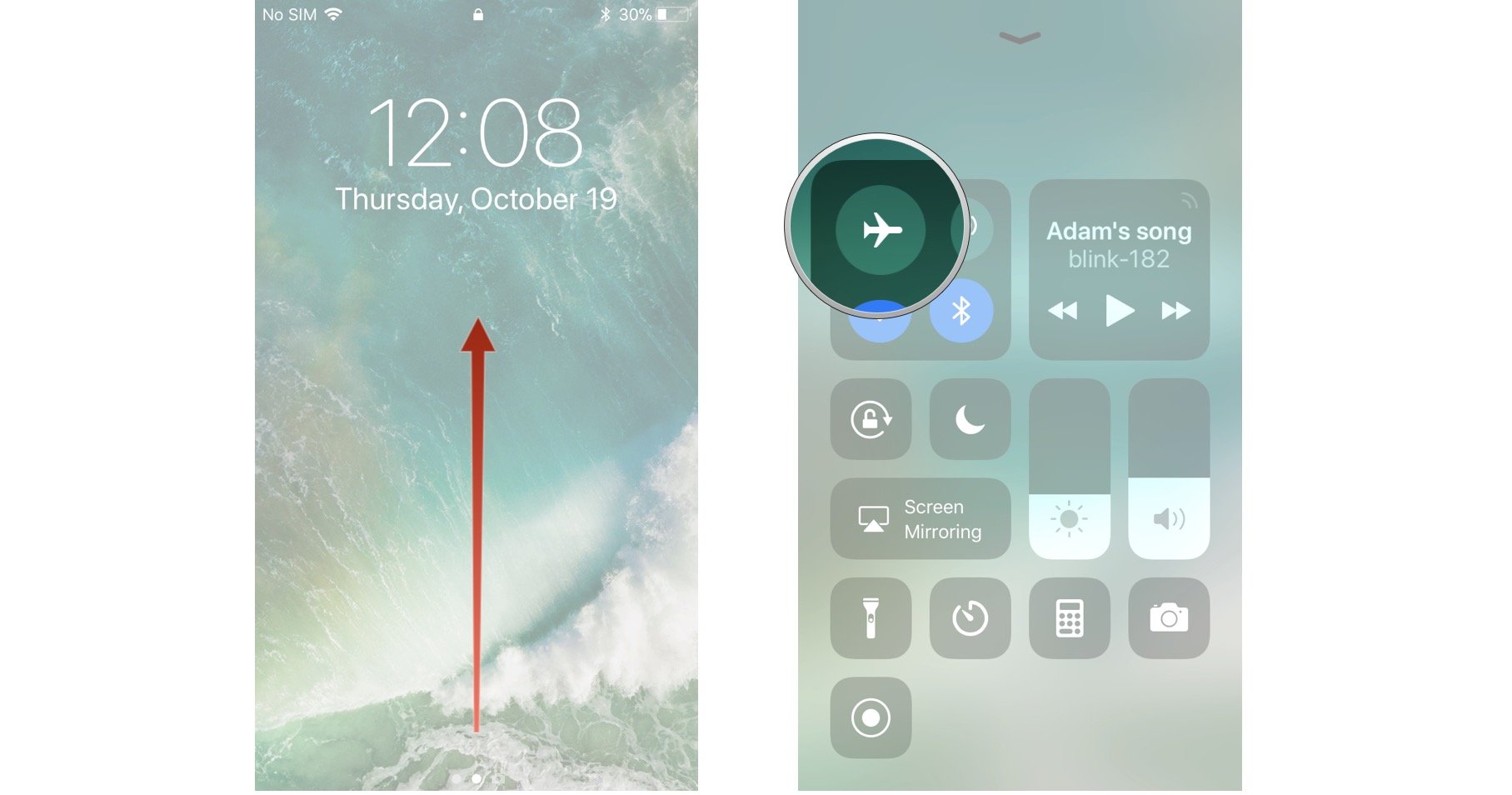
How to turn on Airplane Mode on iPhone and iPad | iMore
A trial and tested approach, which works in most instances, is to switch your phone to airplane mode.
For android users, swipe down from the top of your screen to bring down the notification tray and just tap on the airplane mode button.
For iPhone users, Swipe up from the bottom of the screen and for iPhone X series users, swipe down from the top-right corner of the screen. Just tap on the airplane mode button. It’s a good idea to wait for something between 30-60 seconds before turning airplane mode off because it takes a short while to kick-start and speed up your data connection.


  • Restarting your Phone

Secret trick to speed up your iPhone in 2 presses without ...If airplane mode fails to boost slow data connection, you can always take things up a notch and restart your phone altogether.
Android users can press and hold the power button or the power button and volume down button simultaneously to display the on-screen menu to tap the restart button. If a restart button isn’t available, simply press and hold the power button till the screen goes black, and then turns on again.
For iPhone users, simply press and hold the home button till a power slider is displayed. Then just use the sleep/wake button to turn it back on. For iPhone X-series users, use the side button along with the volume up or volume down button till the power slider is displayed. Once turned off, use the side button to power on again.


  • Removing your SIM card

How to remove the SIM card from a Samsung Galaxy S10 - Business ...Another option to speed up your data connection is to remove your SIM card while the phone is turned on. You will need a SIM card tool which usually comes with the phone. However, a paper clip or a common pin will suffice too. Remove the SIM card to check for any damages. If all is okay, insert it back in. For phones with an eSIM such as the iPhone XS, XR, Pixel 3, etc., there won’t be a possibility to remove an embedded sim. The next best option is to restart your phone as described above.


  • Change your location
    This hack might be a little inconvenient because it’ll ask you to move from one place to another. Sometimes being in a building or being surrounded by buildings can choke signals. If that is the case, you might have to walk a small distance to a spot which allows better signals and by default, allow you to boost slow data connection.


  • Disable Data Saver/Low Data Mode

Check the cellular data usage on your iPhone and iPad - Apple AtbalstsBoth, Android and iOS phones have been designed to reduce data usage. Although it’s a good tool if your data package is limited, it can sometimes cause a slow data connection. Give it a try to disable this setting and experiment if it enhances your data connection speed.
For android phones, just go to Settings > Network & internet > Data Saver.
For iPhone users you can find and toggle the Low data mode option in Settings > Cellular > Cellular Data Options.
If your data usage is a concern for you, it’s a good idea to turn this setting back on once you’re done using a faster data connection speed. This will help you to check if this setting was a factor limiting your data speed.


  • Disconnect from VPN
    Although VPNs give the benefit of privacy and anonymity while browsing, it can also take a toll on your mobile data speed. Check to see if you’re connected to a VPN if you’re experiencing slower speeds on your mobile data. If you’re connected, disconnect. There’s a good probability that you will experience an improvement in your mobile data speed almost instantly. You can always reconnect to your VPN once you’re done.


  • Reset your Phone’s Network settings

What Happens When you Reset Network Settings on Android and iOSThis tip although can help, but will also cause you a slight inconvenience as it’ll reset all your paired Bluetooth devices and Wi-Fi access points. So, it’s better to use this option as a last resort.
For android users, you’ll be able to toggle the reset network settings option through Settings > System > Advanced > Reset options > Reset Wi-Fi, mobile & Bluetooth. There’s a possibility that you’ll find this in a different location depending on the phone you’re using, but rest assured, you’ll find this option in your settings.
For iPhone users, you can reset network settings by going to Settings > General > Reset > Reset Network Settings. This will trigger a prompt to enter your passcode. Enter that and you’re good to go.


  • Call your network Operator
    If all else fails, simply call your network operator. There’s always the possibility of an outage or some other technical difficulty on their end. If the problem indeed turns out to be on their end, they’ll be able to help in one for or the other. If nothing else, it’ll provide the validation that the problem is on their end and not yours, which in a frustrating situation like this, can provide some ease of comfort.

There’s also always the option of investing in a signal booster to speed up your data connection, if you’re living in an area which has low connectivity in general. However, the only downside of this is the cost as network boosters are a one-time investment. Prices can variate from $399 to $999 depending on the coverage.

Previous
How to Disinfect Phone During Coronavirus Disease?
Next
How to Transfer Contacts from iPhone to iPhone [Detailed Guide]

Related Articles

AirPods Pro 3 and 2 Protection Guide 2026

AirPods Pro 3 and 2 Protection Guide 2026: Stop Buds Falling Out with Smarter Daily Habits

esr find-my magsafe wallet:never worry about the lost your wallet

How to Find Your Lost Wallet: From Old-School Solutions to the Modern Fix

10 Fixes to Solve iPad Battery Draining Fast

How to Solve iPad Battery Draining Fast - 10 Fixes You Should Know

keep iPhone Battery health

The Great Wireless Charging Debate: Is It Really Harming Your iPhone Battery?

Leave a Comment

Your email address will not be published.

Instagram

Company

  • About Us
  • Our Blog
  • Newsroom
  • Become a Reseller

Products

  • Designed for MagSafe
  • Protective Phone Cases
  • iPad Cases
  • Screen Protectors
  • Wireless Charging
  • Productivity
  • Magnetic Wallets
  • Other Accessories

Community

  • My Account
  • Affiliate Program

Support

  • Contact Us
  • Setup Videos & FAQs
  • Order Status
  • Return and Refund
  • Warranty Policy
  • Shipping Policy
  • Payment Methods
  • Product Recall

Payment options:
  • American Express
  • Diners Club
  • JCB
  • Mastercard
  • PayPal
  • Visa
  • Klarna Klarna
Excellent 4.6 out of 5 - Review :2544 •

© 2026 ESR All rights reserved.

  • Terms of Use
  • Privacy Policy
  • Legal Declaration
  • Cookie Policy
  • Shipping Policy
  • Return and Refund
  • Do not sell or share my personal information
  • Search

Shopping Cart

Get a 15% off coupon when you

sign up

for free shipping!

£38.00
You're £38.00 away from Free Shipping!

£45.00
You're £45.00 away from Free Shipping!

Benefits applied automatically at checkout

Your Cart is Empty

Sign In / Register to view saved cart items
Shop Now
ESR_IMG

Protect Your iPhone's Camera Control

ESR_IMG

Drop-Proof FlickLlock, Effortless MagSafe

ESR_IMG

Always Find Your Wallet

ESR_IMG

Qi2 Fast Charging on the Go

Subtotal £0.00
View Cart

Thank you for choosing to transfer to a human service.

Sorry! The previous responses were from our AI customer service. Since it didn't satisfy you, you've been transferred to a human agent. We'll reply within 24 hours from Mon to Fri and 48 hours on weekends for further help.

Please select the reason for transfer